
The Best Way to Build an Image
Introduce the internal structure of Docker Image and explain the best practices for building Docker Image.

A brief introduction to container technology and Docker.
Before delving into containers, let’s first understand what virtualization technology is. In the early days of computing services, each server typically ran only one application or service. To ensure stable and secure operation of the application, servers were usually equipped with configurations far exceeding the performance requirements, which led to extremely low resource utilization and significant waste of resources. Moreover, every time a new application or service needed to be launched, a new physical server had to be purchased, imposing high hardware and management costs on enterprises.
To address the aforementioned issues, virtualization technology emerged. In simple terms, virtualization technology enables users to create multiple virtual operating environments based on a single physical hardware system, thereby enhancing resource utilization, reducing hardware costs and management expenses.
In the 1960s and 1970s, IBM first introduced virtualization technology on mainframes to support multi-user environments.
In the 1990s and 2000s, VMWare pioneered virtual machine technology, enabling virtualization technology to be applied on ordinary servers.
Since the 2000s to the present, container technology has been widely applied in large-scale distributed systems and became popular after the emergence of Docker.
Today, virtualization technology has become a core component of modern IT infrastructure, serving as the cornerstone of cloud computing and driving the development and transformation of computing models and large-scale distributed systems.
In a nutshell, a container is a lightweight and portable virtualization technology used for packaging and running applications along with their dependencies.
As the two core technologies of virtualization, containers and virtual machines are often compared. Both are used to integrate various IT components and isolate them from other parts of the host system to encapsulate the computing environment. The difference between the two lies in which components are isolated, which in turn affects the scale and portability of each approach.
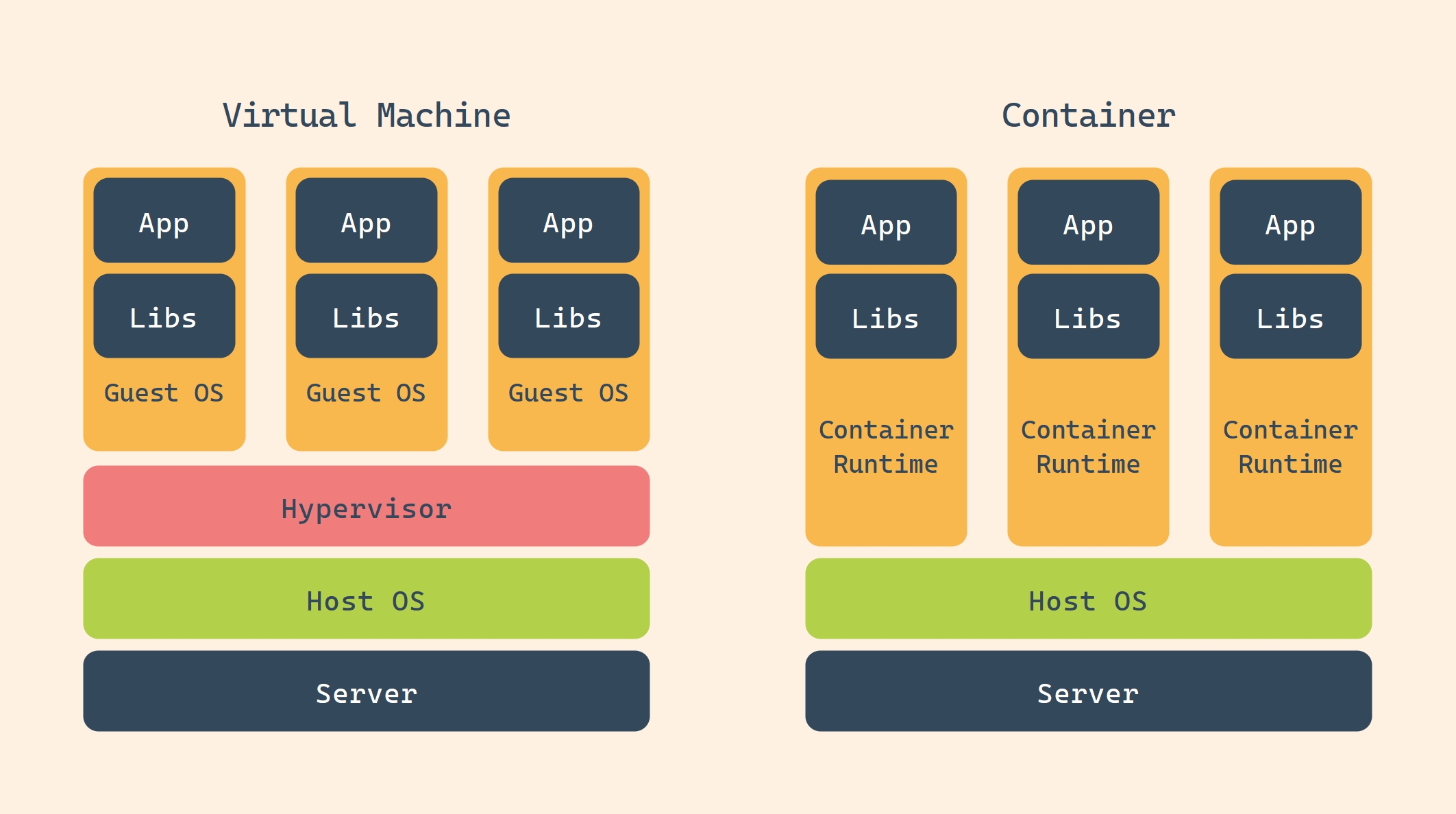
Virtual Machine vs Container
Virtual Machine (VM) technology: A technology that simulates a complete computer system through software, allowing multiple independent operating system instances to run on a single physical hardware. Each virtual machine (VM) contains its own virtual hardware (such as CPU, memory, storage, and network interface) and can run an independent operating system and applications.
Container technology: A lightweight and portable virtualization technology used for packaging and running applications and their dependencies. Unlike traditional virtual machines, containers share the host operating system’s kernel but ensure that applications run in isolated environments through isolation mechanisms such as namespaces and control groups.
| Features | Vistual Machine | Container |
|---|---|---|
| Virtualized object | The entire operating system | The application and its dependencies |
| Startup speed | Minute-level | Second-level |
| Resource occupation | High (Each virtual machine requires a complete operating system) | Low (Shared hosting core) |
| Isolation | Complete isolation | Process-level isolation |
| Portability | Low (Dependent on virtual machine images) | High (Dependent on container runtime) |
Before Docker emerged, container technology already existed. However, due to high complexity, an incomplete toolchain and an immature ecosystem, it was difficult to apply and thus failed to gain widespread use. It was not until Docker was released in 2013 that it greatly simplified the use of containers and promoted the popularization of container technology.
Nowadays, Docker has become the de facto standard for container technology, but there are still many other container platforms. To ensure compatibility among different containers, several companies including Docker, CoreOS, and Google established the Open Container Initiative (OCI) to formulate container specifications. Currently, the OCI has released two core specifications: the Runtime Specification and the Image Specification. These two specifications guarantee that containers developed by different organizations and vendors can run on different runtimes.
Docker has the following core concepts
Docker Engine: The core service of Docker, running in a C/S architecture, is used to create and manage Docker objects.
Docker Container:A Docker container is an instance of a Docker image and represents an independent application environment.
Docker Image:The read-only module, runtime creates containers through Docker Image.
Dockerfile:A text file containing a series of instructions for building a Docker image.
Registry:A repository for storing Docker images.
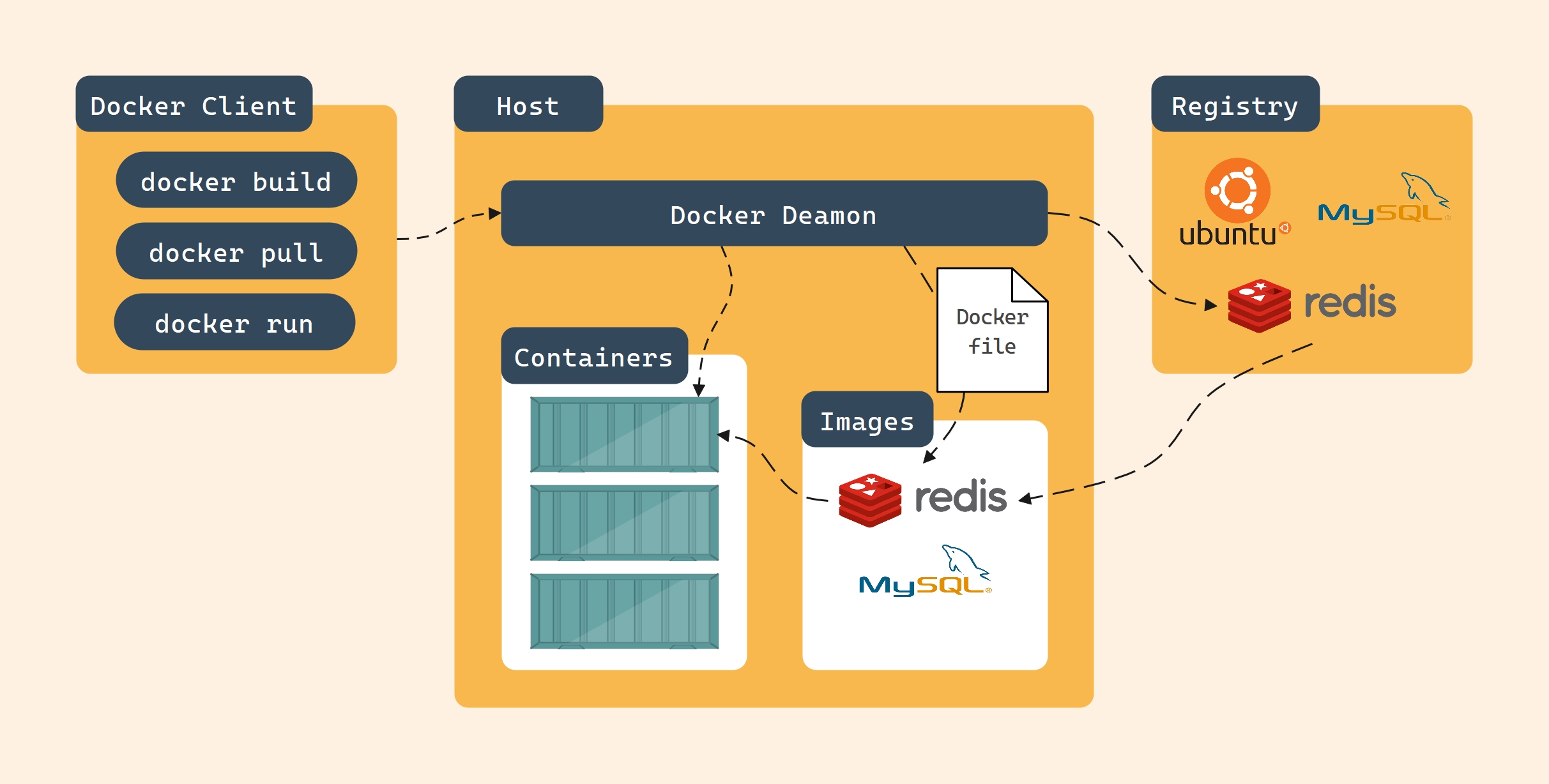
Docker Architecture
Docker Engine is an open-source containerization technology used for building and containerizing applications, running in a C (Docker CLI)/S (Docker Daemon) mode.
Docker Daemon is the server-side program of the Docker Engine. Generally, it runs as a daemon (dockerd), providing Docker API services and supporting the creation and management of Docker objects, including Docker Images, Docker Containers, Networks, and Volumes. By default, the Docker Daemon only responds to local client requests. However, it can be configured to open TCP listening to support remote client calls. Additionally, Docker Daemon can communicate with other Docker services, which is mainly used to build Docker service clusters, Docker Swarm.
The Docker CLI is the client program of Docker Engine, which can interact with the Docker Daemon by using CLI commands and invoke Docker APIs to manage Docker objects.
A Docker container is an independent application process that contains all the files the application depends on, thus being completely isolated from the host environment. It has the following features:
Self-contained: Each Docker container has everything it needs to run, and there is no need for the host to pre-install any dependencies.
Isolation: Each Docker container is an isolated sandbox that has minimal impact on the host and other Docker containers, enhancing the security of applications.
Independence: Each Docker container is independent. Modifying one Docker container will not affect other Docker containers.
Portability: Docker Containers can be easily transplanted to any running environment, whether it is on a local machine, a server, or in the cloud.
A Docker Image is a standardized package that contains all the files, binaries, libraries, and configurations necessary to run a container. Docker Images have two important features:
A Docker image is immutable. Once created, it can only be rebuilt or modified by using it as a base image.
A Docker Image is a layered structure, with each layer representing a series of file system modifications, including adding, deleting or modifying files.
A Dockerfile is a text file used to define how to build a Docker image. It contains a series of instructions that describe the base environment, application code, dependencies, and runtime configuration of the image. Through a Dockerfile, consistent and repeatable Docker images can be built automatically.
A Registry is a repository used to store images and share them with others. It can be either public or private. Docker Hub is the most commonly used open Registry. You can also build a private image repository through applications like Harbor.
The emergence of virtualization technology is aimed at addressing issues such as resource waste, high costs, and complex management in traditional computing environments.
Both virtual machines and containers are virtualization technologies that encapsulate computing environments through resource isolation. However, due to the different levels of resource isolation, they have significant differences in terms of virtualization degree, encapsulation, isolation, and portability.
| Features | Vistual Machine | Container |
|---|---|---|
| Virtualized object | The entire operating system | The application and its dependencies |
| Startup speed | Minute-level | Second-level |
| Resource occupation | High (Each virtual machine requires a complete operating system) | Low (Shared hosting core) |
| Isolation | Complete isolation | Process-level isolation |
| Portability | Low (Dependent on virtual machine images) | High (Dependent on container runtime) |
Introduce the internal structure of Docker Image and explain the best practices for building Docker Image.